Dedicated to Flying Fifteen Fleet Racing in London and the South East. Beautiful Boats, Great Racing, and Friendly People to the West of London.
http://www.flyingfifteen.com
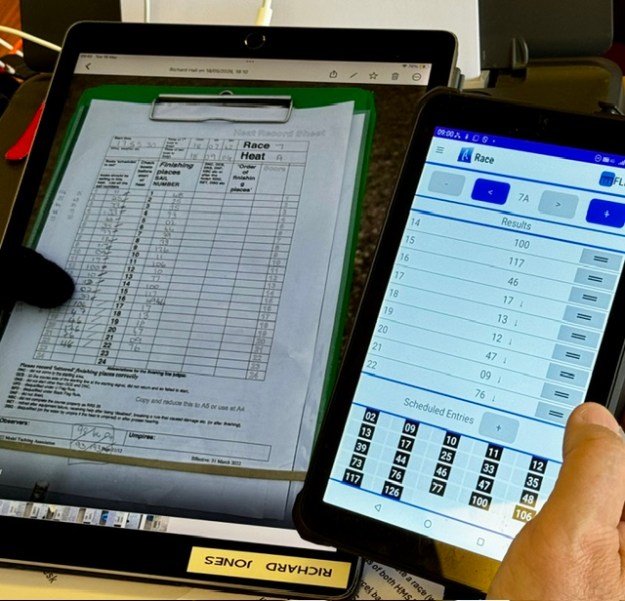
(A4 sized iPad Pro receiving score sheets fromThe Finish Line. Note this means you automatically have backup images of all your heat score sheets as they come in. Safely stored in your WhatsApp group.)
You cannot get half way through the Worlds, then lose all your data.
It maybe will surprise the uninitiated path you maybe spend more time “backing up” than you do entering scores. It’s a big deal.
We held three levels of race data:-
1/ On USB sticks (double ended USB-C and USB2, so you can plug into just about anything), we had our Current Data. Keep this folder neatly filed inside subfolders as you go.
2/ On the hard disk of our HMS primary lap top, we held our first level of data backup.
3/ The hard disk would automatically back up (if MS Cloud was working!) into OneDrive. All scorers and Officers were authorised to access the cloud folders.
We had two times that we did backup processing.
1/ At the end of every heat (so about 3x an hour) we would backup the three device layers above, being very strict about naming conventions. (more on that later)
2/ At the end of every race, as A heat had been entered, we would send a set of backups out via email to all the scorers and Officers in case of a proper disaster.
Naming Conventions :-
As we had different scorers on data entry duty each session , it was important that we all used the same naming convention and backup routine. We used a great concept from Andrew Crocker who was the Scorer at Gladstone.
the current heart was always named “current heat” and not by its heat number.
as we saved the backup, it would be named “heat 3b” , for heat b race 3 for example –the same in all layers of storage.
for extra security against gremlins, we wanted to build in a fresh close/reopen of excel as we proceeded.
Were found the quickest most foolproof way for heat backups was
1/ While in “current heat” , hit the little purple diskette icon (“save”) at the top of the excel spreadsheet
2/ Select “save as” and change the name from. “current heat” to “backup heat Nx” eg 3a, as you go. Save in the USB, and then on the hard disk.
3/ At this point your live spreadsheet is called “backup R3d” for example. Not what you want, so CLOSE excel completely and then go and find “current Heat” and re-open it. You are now ready to score again with a hopefully fresh excel.
If it is the end of a race (end of heat A), do all that, then email via outlook your “backup heat Nx” file to a list of the scorers and Officers. Your disaster copy – that should be your “Get Out of Jail” card if everything blew up.
Every year, radio sailing will have a large World Championship running somewhere. We found that not much definition of “how to do it” gets passed on from one generation to the next.
The thing about Scoring a large one week event, is that it’s NOT at all the same challenge as scoring a weekend event,…. “but only bigger”….
Honestly – entering the scores is a tiny part of what needs to get done.
The number of people who will volunteer to help, may be what you need…. may be a different number. “Unbelievably” at the IOM Worlds we had a roster of 5 plus one subject matter expert on the phone all day from New Zealand. I most often score a weekend event, with one person – me.
So why a larger team?
1/ Venue layout. Not the same as normal racing at Datchet – these Datchet Worlds courses were widely spaced out. There were issues as to the where the Race Control Van could go. We had to think through our primary objective of always having a Scorer at the line, and how/where we got the Scoring processes done. It’s not going to be one person. We figured and tried a minimum of three. Not enough. Entering Scores is not the biggest part of the job.
2/ The BIG Thing….. If it’s a large scale, one week, championship you need enough people to cover the fact that most volunteers have to work weekdays for a living. You need at least the minimum number of people every day. You also have build enough scorer capacity to cope with a team member falling sick, or cannot get through traffic etc. TIP : Build a roster and publish it. Try on any day to roster your minimum number plus one.
3/ if you are missing a key team member contribution, you must have the ability to keep going.
We needed at least three scorers on duty on any day. We had five volunteers to cover this, plus a subject matter expert on the phone. I took everybody. Good job we did. There were plenty of hours where we were all flat-out working. The workload arrives in waves. We took no lunch breaks either. Eating/drinking was on the hoof. Don’t mention “Standard Redress” processing either.
If 5 people stand up for the job, naturally different skills can be brought to bear. If the daily number on duty varies from 3 to 5, you cannot really have a set role per person. Any team member must be able to do any role. So what you do, is not assign roles to each volunteer. What you do is document your key processes, then “Staff the processes”.
It’s important that key processes (eg backups) happens the same way each time no matter who is the duty scorer assigned to do it that day. Document the processes. More on that in later article.
Special contributions:-
It’s surprising/delightful what people can give.
1/ It turns out that most frequently used “asset” the scorers produced was our chronological filing library. Our ‘Runner’ role in addition to ONB and document transport, was defined to also complete our librarian function on our behalf. Honestly it was SO useful – Race Team, Umpires (checking their own decisions!), Board Managers would come in on-spec and inspectthatfile. We started with score sheets and results in one folder and umpire paperwork in another file. It needs to be on paper no matter how many laptops you have. Our librarian quickly realised that separate filing was wrong – file all that together in ONE time-ordered folder. This folder became so large that it eventually filled TWO lever arch files. We also had to keep “parking lot” issues on large flip charts on display for all to see. Vital as it turns out – for ticking off completed tasks.
It’s a big deal.
We had one team member who admitted he was technology averse – and he built and maintained all of that for us. Brilliant.
2/ Our most valued innovations often came from RH. He was fantastic. A process genius. Professionally ? He is a Schoolmaster….
I now see that the key skill of a Schoolmaster is to organise work so that even a group of recalcitrant teenagers will manage to complete it. RH gave us the most profoundly simple methods and they helped the team to a ridiculous extent. The way we laid out our work area, the way we named our backups, we way we built our crib sheets (and where we placed them), how we processed paper arriving in the room…. and really critically, RH (very fit) built a process tick sheet for a duty scorer being out at the line, as the Scoring Office representative…. It was with always him inside a waterproof cover and ticked off as racing progressed. As a Six Sigma process guy, I was stunned. Amazing.
So – for your Championship at your Club, if you need to build a team:-
1/ Define and Document your processes first. Then find people and staff your processes on a daily chart.
2/ Find what skills you have between the team, and use them to their best effect. People can give a lot. If they feel they can challenge the most obvious, then that’s the best you can get.
3/ Rotate the team members as much as you can. Give them all a “go” at all the processes. Not always possible, or easy, but give it a try.
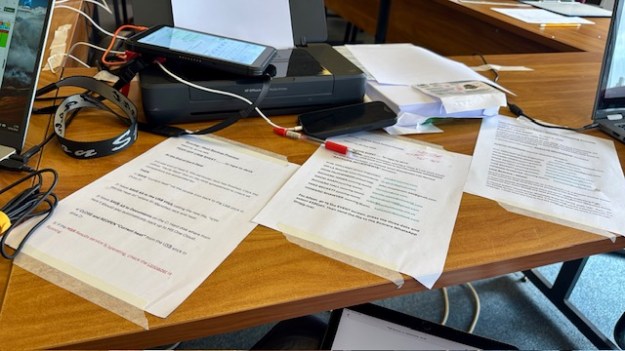
The photo above shows you our Scoring Team’s Process Crib Sheets. Note … taped to the desk (cleaners came every night), and angled in to the HMS Scorer position. We did a lot of preparation on “process” and we shall write about the importance of that in another article. There are three process sheets here:-
end of heat backups
end of race backups
end of race results publishing
There is of course one missing.
Standard Redress processing.
It’s missing because none of the Team, including me, understood in advance quite how important the work around Standard Redress was going to be. It’s massive.
It’s best tackled not at the end of the penultimate day… but in every race as you go through the Championship.
Most of us had never seen fully Umpired racing before. Interesting experience.
When the Umpires deliberate, a possible outcome is that an aggrieved party – knocked to the back of the fleet perhaps – can be awarded a “Standard Redress”. It is widely acknowledged by the Umpires that the HMS Excel scoring system does not have support for Standard Redress. This type of redress includes future score averages in races after the redress was awarded. It will be a manual calculation for the Scorers to complete after the last race of the penultimate day (look up on google or IOMWorlds2026 Jury Notice 1 for the Worlds). Redress awards given on the final day can use the standard HMS Excel button for “RDGave”. HMS Excel calculates redress awards looking backwards only – not into the future.
In UK, where use of HMS Excel is the norm, as there is no tool for Standard Redress we have a tendency not to use it. At the IOM Nationals we processed one. I’d not seen one before.
To be honest, it’s a very manual and error prone calculation. Get your calculator out and try one.
At the Worlds, after three days the Umpires had awarded three standard redresses. Concerned about what this would mean for workload at the end of the penultimate day:-
racing ends around 1830
scoring completes and winds down about 1900
1-2 hours of standard redresses to calculate, check, check again and then apply to HMS Excel
drive home (1-2 hours)
eat main meal of the day
go to bed
get up at 5am and do it all over again
… so I emailed the Umpires to “alert them to Scorer’s concerns as to the viability” of averaging one Standard Redress per day.
In the next two days of racing the Umpires awarded another 7 Standard Redresses. So we had 11 in total, two of them with one competitor. I had brought my Casio calculator and a ruler just in case….
Essentially for 12% of the fleet, you pop them into a boutique scoring system of their own. We had to separately hand calculate special scores based on ALL heats to date, check the rounding to 0.05, remembering which scores to exclude. (a competitor with two awards is a trap!) Then you have to apply the WORSE/BETTER score test to each Redress … then decide whether to apply to or not …. then load the answers into HMS.
Then ….publish race results to competitors so they knew exactly where they stood going in for the final day.
If you’ve read this far, you’ll understand the Scorer’s alarm.
So what did we do??
In flight, we designed, built, tested and used our own Standard Redress tool in Excel on our fourth laptop. We kept it up to date as Umpire decisions arrived, and race by race. At this award rate, no alternative really.
You can download our Standard Redress tool here on this link.
You are welcome to use it. If you discover an error, honestly… don’t tell me.
Points to note:-
every skipper with an award is tracked through the entire regatta, race by race
when you get an award in race N, you have to dig out all the scores in Race(1-(N-1))
watch out for the result exclusions
a skipper can have more than one award (see CRO33) and you have to cope with that
rounding needs to be watched
BETTER/WORSE Test needs to be applied
There’s a lot of calculating in there and you will see for each competitor, we ran the BETTER/WORSE test manually.
Before you load these Redresses into HMS, you need to audit them carefully. There would be hell to pay if one of them was wrong – Race Team protested etc. So how to do that audit?? The Casio Calculator??
You will note in the spreadsheet that each awarded competitor was audited (checked) by AFleet. AFleet happily has a Standard Redress button and we used it to check the answers our new tool was producing. You will see them there coloured black. Only when everything agreed, did we release the calculations for processing. Did AFleet find an error in the spreadsheet?? Yes – one. It might otherwise have snuck through undetected. But we found it.
Thank heavens for Parallel Scoring, eh??
Funny side-story :
This was a feverish work session and the whole team was ultra-focussed on their own contribution. Intense, it was. We hammered through all the processing and safely got the correct double checked answers keyed back into HMS Excel. Then I said to the Afleet scorer, “OK that’s done. Let’s do the same on the AFleet results now.” My colleague looked at me blankly and replied, “No … I finished all that ages ago….”
It built a little tension into the Umpire-Scorer relationship, I can tell you. In a very kind gesture, the Umpires presented us with gin and fruit cake. They were OK guys after all !!!


 Datchet Radio Sailing - Making It All Much Easier !!