Tag Archives: whatsapp

IOM Worlds : Scoring, Backing Up Your Data….!

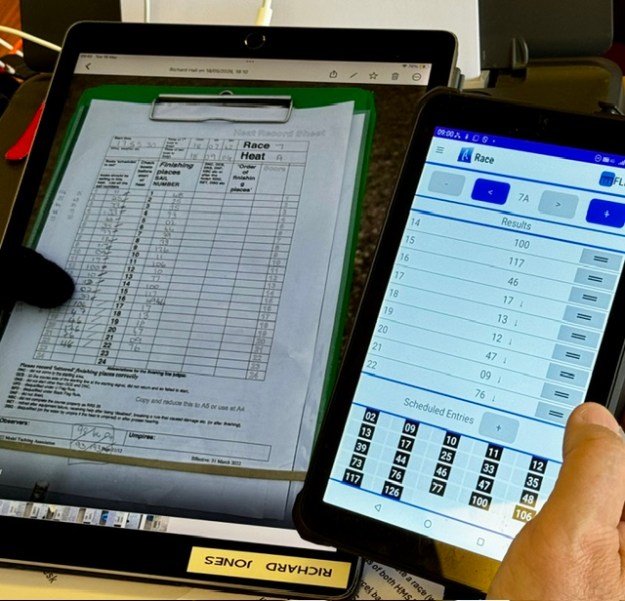
(A4 sized iPad Pro receiving score sheets fromThe Finish Line. Note this means you automatically have backup images of all your heat score sheets as they come in. Safely stored in your WhatsApp group.)

You cannot get half way through the Worlds, then lose all your data.

It maybe will surprise the uninitiated path you maybe spend more time “backing up” than you do entering scores. It’s a big deal.

We held three levels of race data:-

1/ On USB sticks (double ended USB-C and USB2, so you can plug into just about anything), we had our Current Data. Keep this folder neatly filed inside subfolders as you go.

2/ On the hard disk of our HMS primary lap top, we held our first level of data backup.

3/ The hard disk would automatically back up (if MS Cloud was working!) into OneDrive. All scorers and Officers were authorised to access the cloud folders.

We had two times that we did backup processing.

1/ At the end of every heat (so about 3x an hour) we would backup the three device layers above, being very strict about naming conventions. (more on that later)

2/ At the end of every race, as A heat had been entered, we would send a set of backups out via email to all the scorers and Officers in case of a proper disaster.

Naming Conventions :-

As we had different scorers on data entry duty each session , it was important that we all used the same naming convention and backup routine. We used a great concept from Andrew Crocker who was the Scorer at Gladstone.

  • the current heart was always named “current heat” and not by its heat number.
  • as we saved the backup, it would be named “heat 3b” , for heat b race 3 for example –the same in all layers of storage.
  • for extra security against gremlins, we wanted to build in a fresh close/reopen of excel as we proceeded.

Were found the quickest most foolproof way for heat backups was

1/ While in “current heat” , hit the little purple diskette icon (“save”) at the top of the excel spreadsheet

2/ Select “save as” and change the name from. “current heat” to “backup heat Nx” eg 3a, as you go. Save in the USB, and then on the hard disk.

3/ At this point your live spreadsheet is called “backup R3d” for example. Not what you want, so CLOSE excel completely and then go and find “current Heat” and re-open it. You are now ready to score again with a hopefully fresh excel.

If it is the end of a race (end of heat A), do all that, then email via outlook your “backup heat Nx” file to a list of the scorers and Officers. Your disaster copy – that should be your “Get Out of Jail” card if everything blew up.


IOM Worlds : Parallel Scoring 4 – Planning Your Hardware Configurations for Any Disaster….!!

This photo above is a snapshot of the World Championship Scoring Office. The essential neat, orderly collection of filed paper documents are out of shot to the left. You’d be amazed just how important that is. I was. The amount of kit might surprise some of you.

Scoring a large Championship will be pretty simple, correct? What can we see here?

….Plan for every eventuality.

Our Worlds hardware configuration had to be cleared and locked away each night for security so all our kit had to be ‘compact’. If anyone walked off with the kit late at night, you’d have a grade A disaster on your hands. Kit lived on-site and was never taken home in a scorer’s car, for example.

Let’s start with the easy part first:-

Laptops.

We had four. Honestly we had long periods where all four were in use. More on why this was, later. We used a Macair dedicated for Standard Redress modelling, and three (!) for HMS Excel. Of the three Microsoft HMS laptops, two were Windows 11 with Office 365, one was Windows10 (our PRO reported very stable HMS performance on Windows 10. )

Printer: –

Let’s start with the final product first. Essential for the designated posting of Results is a printout on the Notice Board. We borrowed from Jim a simply beautiful piece of kit. For printing we used a battery driven, very compact, HP200 printer. It could run on mains or battery. Utterly brilliant kit. Must get one. You need to carry a supply of spare ink cartridges and tons of paper. The printer was essential to our result audit process too.

Just to illustrate the notion that if anything can go wrong, it will do so at the worst time….. At the IOM Nationals we ran out of black ink just as we were about to print the final results for distribution. Carry two sets of backup ink, if I were you. We had a conventional backup printer normally for the Race Control Van. If pushed, we could also print in the Clubhouse Admin Office. If you cannot print your results, it’s “game over”.

On the first scrutineering day at the Worlds, I arrived at the Club to find a regional power outage. No power. One in a thousand chance, right ?? Well, with our kit and battery printer, scoring could keep going in any event.

Tablets :

We had four Afleet tablets on site, our primary two were matching, ruggedised, waterproof etc. We also had our scoring coach with his Afleet tablet in New Zealand. We shall tell you later how we always had two tablets constantly on “live” with current data. We eventually figured that if the Clubhouse and all the kit was wiped out, the Championship could continue to be scored from New Zealand.

We used a brilliant A4 sized iPad Pro for electronic receipt of score sheets and umpire documentation from the Finish Line. It was flawless. If it had a failure at any point, it would take about 2-3 minutes for the paper documentation to arrive in the Scoring Office. We could also pick up the electronic copy of score sheets via the Afleet tablet if we had to.

We were making heavy use of WhatsApp and if it failed, we could switch to Signal for the same functions.

Storage :-

Our primary ‘disk’ storage was always USB sticks, not the hard disk…. so that in case of trouble we could jump straight to our hot standby laptop. We had three USB sticks – all double ended bearing both USB-C and USB2 connectors. They were very large GB too. We shall write more in a separate article about how data backups worked. We held all our data at three levels of storage.

Wifi Routers:-

We had two (eventually three when satellite arrived). Our main 4G Router (and the satellite router) was mains powered. Our backup 4G Router could run off mains or battery. In the photo foreground, that unit with two little ears sticking up was our primary 4G Router.

Power :-

We had enough chargers frankly to charge anything regardless of ports.

We had extension leads with power-surge protection.

In case of really long power outages, we had three 13amp battery power supplies on site and ready if we needed them. We could probably run for a couple of days on even just one of those.

We stayed in touch with the Race Course happenings by having a VHF Radio in the room tuned in to Race Team internal announcements.

Protect your Club Reputation.

Plan for anything and everything.

IOM Worlds – Championship and Regatta Management – WhatsApp Has Arrived….!!

From 2024, Datchet Radio Sailing started experimenting with WhatsApp Groups as part of Open Meeting, Regatta and Championship Management.

Lots of Clubs will be doing the same, and if WhatsApp goes belly up, you can always switch to Signal or Telegraph. Use of WhatsApp Groups for Competitors, Race Teams, Umpire Groups will already be a regular feature at lots of Clubs Worldwide.

In 2025, at the DF95 Nationals, we also experimented with broadcasting AFLEET live results straight into a Competitor WhatsApp Group. … Amazingly popular that was! … If you are an AFLEET user simply select SHARE on the SCORE screen, pick WhatsApp and off you go. Simple.

Late in 2025, WhatsApp started offering post-beta versions of WhatsApp to support iPads. It transformed the way we scored the IOM Worlds.

The Championship courses at Datchet were three in number. The south and north courses at their furthest extremities (eg finish lines) were probably near 400 metres apart. The Clubhouse stands at the mid point. We had a third course, right in front of the Clubhouse. My normal preference hitherto was to score at the finish line and do all the work in our fabulous Race Control Van. However, at Championship result volumes – plus Umpire Paperwork, SYRPH, Standard Redress and all that – well, working in the confined space of the Race Control Van was never going to be practical. We decided instead to locate work at the Scoring Office in the Clubhouse Boardroom. What a good decision that was.

However, the time to hand carry heat score sheets back, sometimes 250 metres, (and up two flights of stairs, three times an hour!) to the Scoring Office was a challenge.

Our PRO had told us that trials of sending photos of score sheets by email had to be abandoned – email sometimes hits inexplicable delays.

The breakthrough was WhatsApp for iPads – and the use of (my family’s) ancient iPad Pro. That’s basically an A4 sized iPad. ….Amazing transformation in workflow for us.

For safety, security and backup, we would always immediately photograph the heat score sheet as it is handed over by the Board Manager. At the IOM Worlds, when we were handed the sheet the Line Scorer would photograph it straight into the WhatsApp Group and press ‘send’. Honestly, it was instantly popping up full size on the A4 iPad in the Scorers Office – and review, audit checking and data entry could start.

Generally, we were finished data entry by the time the physical score sheet arrived in the hands of our “Runner” ready to go neatly in the physical chronological file. Umpire sheets and protest forms came in the same way. The clarity of the score sheet on the iPad Pro was fantastic.

Amazing, … plus you get to keep the score sheet photo as backup.

Further Implications?

If you also publish results by WhatsApp or the soon-coming “Afleet Connect” , your Scoring Office doesn’t actually need to be on the Regatta site. Remote Scoring Support is now a possibility.

Why would you do that?

  • Scoring Capability and Skilled Volunteers might be a rare thing locally
  • Maybe a large proportion of your volunteer members live a long way away (like Datchet)
  • You might want one weekend to score two regattas at once, sharing skills
  • You might simply want access to a remote “Scoring Coach” to support the onsite team

At the IOM Worlds, we had a “global” team for Scoring. In addition to Datchet club members, we were supported by a World Class expert living in New Zealand. With WhatsApp voice support we used to dial him in at 0830 and he stayed on the line on WhatsApp conference mode all day. As it turned out, for workload sharing that was vital.

If you use AFleet at your Club, it is dead easy to send the small Afleet “Export” file into the Scorer WhatsApp Group any the end of each heat. Aside from automatically backing up your Afleet regatta versions per heat, the key advantage is that any remote Afleet tablets being used for the Regatta (eg Scoring Coach) will always be saying the same as the Afleet tablet at the finish line. We just ran this system at the UK DF65 Nationals for the remote Scoring Coach. Totally brilliant.. You should try it.

We cannot speak highly enough of WhatsApp in this environment. You need a good mobile signal (which we have out on the courses) , or good wifi in your building. You can read more that we have already written on WhatsApp for Radio Sailing at this link below:-

https://drsailing.org/2025/10/01/running-an-open-meeting-or-championship-thinking-of-whatsapp-for-the-event/

\