Category Archives: Batteries and Chargers

IOM Worlds : Parallel Scoring 4 – Planning Your Hardware Configurations for Any Disaster….!!

This photo above is a snapshot of the World Championship Scoring Office. The essential neat, orderly collection of filed paper documents are out of shot to the left. You’d be amazed just how important that is. I was. The amount of kit might surprise some of you.

Scoring a large Championship will be pretty simple, correct? What can we see here?

….Plan for every eventuality.

Our Worlds hardware configuration had to be cleared and locked away each night for security so all our kit had to be ‘compact’. If anyone walked off with the kit late at night, you’d have a grade A disaster on your hands. Kit lived on-site and was never taken home in a scorer’s car, for example.

Let’s start with the easy part first:-

Laptops.

We had four. Honestly we had long periods where all four were in use. More on why this was, later. We used a Macair dedicated for Standard Redress modelling, and three (!) for HMS Excel. Of the three Microsoft HMS laptops, two were Windows 11 with Office 365, one was Windows10 (our PRO reported very stable HMS performance on Windows 10. )

Printer: –

Let’s start with the final product first. Essential for the designated posting of Results is a printout on the Notice Board. We borrowed from Jim a simply beautiful piece of kit. For printing we used a battery driven, very compact, HP200 printer. It could run on mains or battery. Utterly brilliant kit. Must get one. You need to carry a supply of spare ink cartridges and tons of paper. The printer was essential to our result audit process too.

Just to illustrate the notion that if anything can go wrong, it will do so at the worst time….. At the IOM Nationals we ran out of black ink just as we were about to print the final results for distribution. Carry two sets of backup ink, if I were you. We had a conventional backup printer normally for the Race Control Van. If pushed, we could also print in the Clubhouse Admin Office. If you cannot print your results, it’s “game over”.

On the first scrutineering day at the Worlds, I arrived at the Club to find a regional power outage. No power. One in a thousand chance, right ?? Well, with our kit and battery printer, scoring could keep going in any event.

Tablets :

We had four Afleet tablets on site, our primary two were matching, ruggedised, waterproof etc. We also had our scoring coach with his Afleet tablet in New Zealand. We shall tell you later how we always had two tablets constantly on “live” with current data. We eventually figured that if the Clubhouse and all the kit was wiped out, the Championship could continue to be scored from New Zealand.

We used a brilliant A4 sized iPad Pro for electronic receipt of score sheets and umpire documentation from the Finish Line. It was flawless. If it had a failure at any point, it would take about 2-3 minutes for the paper documentation to arrive in the Scoring Office. We could also pick up the electronic copy of score sheets via the Afleet tablet if we had to.

We were making heavy use of WhatsApp and if it failed, we could switch to Signal for the same functions.

Storage :-

Our primary ‘disk’ storage was always USB sticks, not the hard disk…. so that in case of trouble we could jump straight to our hot standby laptop. We had three USB sticks – all double ended bearing both USB-C and USB2 connectors. They were very large GB too. We shall write more in a separate article about how data backups worked. We held all our data at three levels of storage.

Wifi Routers:-

We had two (eventually three when satellite arrived). Our main 4G Router (and the satellite router) was mains powered. Our backup 4G Router could run off mains or battery. In the photo foreground, that unit with two little ears sticking up was our primary 4G Router.

Power :-

We had enough chargers frankly to charge anything regardless of ports.

We had extension leads with power-surge protection.

In case of really long power outages, we had three 13amp battery power supplies on site and ready if we needed them. We could probably run for a couple of days on even just one of those.

We stayed in touch with the Race Course happenings by having a VHF Radio in the room tuned in to Race Team internal announcements.

Protect your Club Reputation.

Plan for anything and everything.
Tired LiPo’s – How to Retire and Dispose…..!!

Even beginners to our sport encounter this debate pretty quickly. LiPos versus LiFes…

I was a little alarmed and disturbed to find my lovely 1800mah LiPos had all suddenly become puffy at the same time. Just two years old…The plastic covering on each battery seemed to be puffed with air/gas not fluid.

Pity – but I’ve realised now I’ve always been anxious about them in the house. They had an easy life – 18C-20C controlled temperature storage, not all that many charges, and always kept in double explosion bags. They have only ever been charged on a LiPo specific intelligent charger at 1amp max, and it cuts off when they’re full.

Mostly I’ve been confident about having them in the house, until hilarious friends email me YouTubes of Teslas catching fire……

So how to best dispose of puffy or leaky Lipos??

I thought perhaps puffiness with just air in there, no fluid,… was possibly OK… but see below. However, everyone agrees that LiPos can’t go in the household waste, not at the supermarket battery collection points either (not for Lithiums). If Waitrose caught fire, I’d never hear the end of it. They need to go to the official battery disposal place at the town dump.

You can’t just take them to the dump though. Best advice I could find was;-

1/ Deplete them totally.

I found they would go to zero current if attached to a receiver for 12-15 hours each. Alarmingly, instead of reducing the gas inside there, they actually expanded further. Blimey. I thought they were going to go “pop”… Like little balloons.

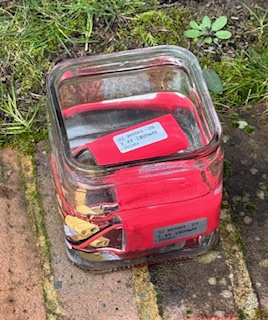
2/ Immerse them in salt water OUTSIDE for 48 hours.(see photo)

I found the most distant corner of the garden.

This is meant to neutralise the connectors and chemicals. Well, HUGE surprise – the water around these apparently “probably still OK” batteries turned a pile milky blue – lots of sediment in the bottom of the jar. So there really was something leaky in there… I threw that down a street drain.

3/ Now they are safe to go to the dump…..

UPDATE : Waitrose do indeed take Lithiums (see their website) – they just ask you to tape over the terminals before you pop them in the collection point.

I’m going to replace them with Hacker 1300mah LiFe’s, same weight to within a gram, same XT60 connectors. More on that later when they go through trials. I have maybe another 6 LiPos in the explosion bag from different manufacturers. I shall be really watching and inspecting them closely.

Transmitter Batteries – Smart Charging ??

When you recharge your AAs and pop them in your transmitter, what voltage do you see?? I’m getting 5.4v… I’m sure it used to be more. Do you get similar?

I was on the verge of simply buying a large box of AA batteries from the super market and burning my way through them – throwing the old ones away, except it’s not allowed of course. I popped in a set of brand new Energiser AAs straight from Waitrose and the transmitter said 5.6v….

For a long while I’ve used the “smart charger” that came with my battery set from Amazon. I’ve got to thinking the charger is not “smart” at all. It just has a symbol that blinks and eventually stays lit when it claims the battery is full. Not very intelligent or smart. I suspect it also does not stop charging at that point…

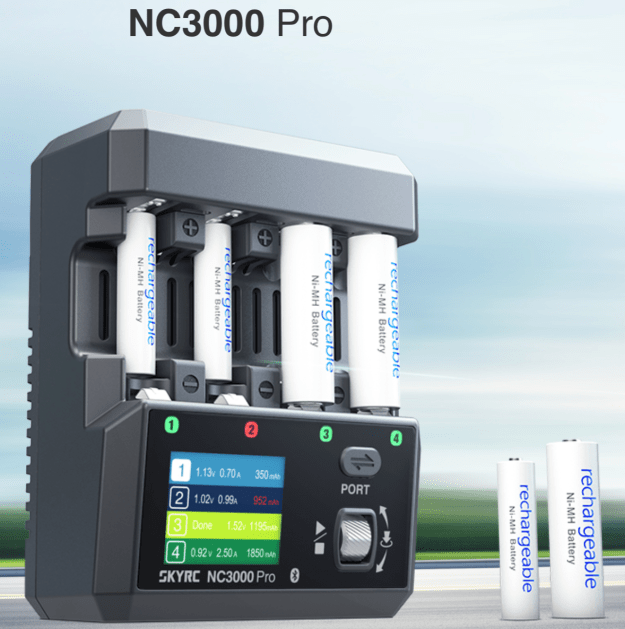
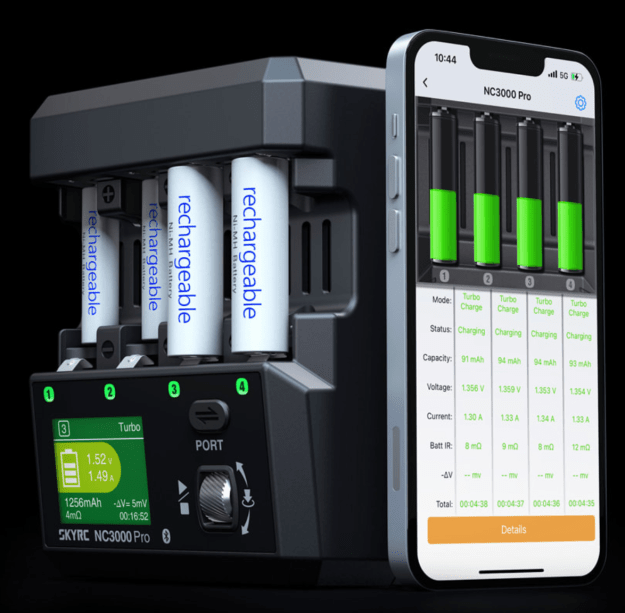
I got to wondering what my favourite LIPO/LIFE charger manufacturer (SKYRC) would make of all this. I’m proper pleased with my LiFe/LiPo charger – a SkyRC T100. To my delight, they make a AA/AAA series of intelligent chargers. You can pay seriously mad money for units that will manage charging of 8 batteries and upwards… 8 at a time would be nice. However, I set a budget ceiling and went for a 4 cell unit.

It manages each battery independently, and you can adjust current, voltage target and a few other things. Critically when it reaches the voltage target, it goes into standby mode – I really wanted that (safety).

If you are inclined, you can manage it from your phone (app).

The only pain is that a PD power unit (whatever that might be) is extra – not sure why but that added another £17 on top.

The transmitter is up to 5.9v after one attempt.

It’ll also re-condition batteries and trickle charge if you want. Great.

https://www.skyrc.com/nc3000pro/