Tag Archives: problems

IOM Worlds : Scoring is Easy – What Could Possibly Go Wrong….??!!

Scoring is easy right? What could possibly go wrong?

Actually scoring really is easy when everything is running smoothly. The challenge for any Club is to know how to handle scoring affairs when something jumps off the rails. As it probably will.

Let’s set aside the morning during the Nationals that my car sunroof spontaneously exploded while driving and showered me with glass. Thankfully not on the highway at speed. However, at a Championship that you might run, just know how your team will cope with a member not arriving for any reason.

The Systems:-

We have mature, proven scoring platforms out there. At the Worlds, we had great (new) hardware in duplicate and triplicate.

This website contains other material about protecting your Club reputation from conventional hardware glitches. There will probably be some. Did we get one of those? Yes, we did.

We had Windows 10 and 11 systems in use. Our PRO had advised that his Windows10 system (goes out of support in 2026?) was very robust. Consequently we had our additional Windows10 system running on nice Dell hardware – nice until in the middle of scoring a heat, the battery gave out. Honestly, we had to run to find screwdrivers small enough from the K7 van. It was “back off” time for the Dell. The Team did a great job of sorting that out while HMS Excel scoring continued on the HP. In an hour, it was back on the air.

The team was far more concerned about software issues, and luckily our team had a Microsoft professional on board. We needed him!!

First off – let me say that I have used HMS Excel at every regatta and championship I have ever scored (3 years, including 3 Nationals and now the Worlds). I adore the product. I love the thing. It comes from an era which is probably the last time that I felt that I understood what was going on in the technology. I’m from the “life is a spreadsheet” generation.

Designed and written by some very gifted and talented people (Henry Farley et al), it’s really very clever and does the job. Used all across the UK, and in plenty of Clubs worldwide. It’s reasonable for us all to think it has been used so many times, is so stable, that it’s the way to go.

We have to remember though that when you press the button in our Excel spreadsheet, over 90% of the machine instructions that get executed are outside the spreadsheet. The executed instructions are mainly in Excel 365 and Windows 11. On our system, the operating system and Excel are updated by microsoft every 20 days or so. It’s actually a very dynamic environment – constantly changing. Not stable at all.

Good advice from the PRO was to have Windows 10, but that goes out of support soon. So we did what seemed natural – and had both. One laptop for each.

The general direction with Microsoft is that going forward if your application was not distributed through the MS App Store (read “fees and costs”), it could be unsafe. They don’t like VB macros or Active X code. HMS has loads of that. It’s what makes it special.

These days, if you buy a new family laptop with Windows 11 Home edition (we have an HP), it comes with Safe-Mode (“S-Mode”) already enabled. You need to switch it off to run HMS. It’s a one way process and no going back. You’ll think twice before doing it. Probably when we all see windows/12 come along, it’ll be even tighter. They don’t like VB and ActiveX. We reckon no family wants to do that switch off process with their household laptop. The general drift will have to be toward dedicated HMS laptops as the years wander by. No problem – but someone needs to think about that trajectory and how the sport best caters for it. Not impossible at all.

Graham Bantock has advised me a couple of times that if you get an HMS software problem, the first thing you notice is that people will tell you that it doesn’t happen on their system. Never a truer word. So how did we get on??

1/ Going back to 2025, we have had a few “white screen” moments on Windows/11. Everything locks up. To get passed it at first, we did complete system re-boots (2-3 minute delay?) which seemed to fix it. We now suspect that simply forcing Excel365 to quit and then restarting the spreadsheet is enough. At the Worlds, we built this close/reopen of Excel into our backup process (suggested originally by Andrew Crocker) at each heat completion. The problem didn’t come back.

2/ MS Cloud Failure :

At our Dress Rehearsal, the IOM Nationals, we had our first big challenge for our HMS Excel setup. We were running on Windows/11 and suddenly we couldn’t communicate. No email. Then we realised that MS OneDrive (MS Cloud) had gone down. It stayed down for 20 hours. Naturally, we thought it was something we had done, but after 20 hours it just popped back online again. . A minor impact was that our third level of data backup ceased working. …OK – no big deal…. The huge thing for us was that we were sending results to the event webmaster via email. So we could not get results to him. It seems that on Windows/11 and Excel/365, the Outlook mail server needs One Drive running as it seems to keep its contact folders (or something) in there. No Cloud, so email stops.

After two hours our Microsoft expert found the circumventions. (a) the problem did not occur on our hot standby laptop with its Windows/10 system – see PRO advice! (b) it was still possible to use the mail service via its own dedicated email website portal. Still – it was a fight to figure this out and STAY SCORING for a couple of hours.

3/ Visual Basic Error 1004

This was our big one. Life threatening stuff. My medications were at home!!

We had a wave of after-the-event Umpire decisions arrive to apply to the scores already in the system. Nothing complex and we had sixteen heats already inside HMS. How many results is that? It’s about 350 boat scores. We made the umpires’ alterations – nothing we haven’t done before many times and suddenly we got “Visual Basic Error 1004″… telling us to log in to VB. Multiple attempts to get past this point kept locking up with Error 1004 – but with varying messages.

If it had happened later in the regatta, maybe after five days, it would have been a “game over” moment.

HMS Excel, or any system, doesn’t get used often at the maximum 84 boats level. With this combination of Windows/11 and Excel365 we could quite possibly have been the first. Anyway – we were stuck at sixteen heats and simply nothing would go in. Properly stuck.

(As a team with four software guys in it, we had a feeling as to what the Error 104 was getting at. For sure, our theory will not turn out to be what it was, but we shall write about it later on this website.)

In a somewhat religious moment, I spotted Graham B right outside the Scoring Room door. Graham’s amazing and very, very calm… and a World authority on HMS. Honestly – It was like being knocked down by an ambulance.

Graham listened carefully to our problem description then simply said, “You need to speak to Lester”. We called Lester straight away. God surely does exist as Lester answered immediately.

Lester’s advice was that when Error 1004 starts, it never, ever, goes away. You have two choices – step back through the backups until you find one that works (takes time), or… bite the bullet and go right back to an empty spreadsheet and start all over again. Enter the Umpire decisions in the normal in the normal flow and not after the event. Enter those 350 results from the beginning.

That’s what we did. The Commodore stepped in to help me reload the entire regatta to date. The team carried on scoring into the Parallel System. It took around two hours to diagnose, re-enter and check – then catch up with real time.

Frankly – I thought I was going to die. Stress is hardly a good word.

That’s what we had a parallel system for, of course. We could switch across at any time and keep going. In the heat of the moment, we knew how all that was going to work. However, we had not thought out an approval process to permit the scorers to dump one of the scoring platforms and keep going on the other. Interesting.

At this moment, we still had around 4-5 days of Championship to go. So what did we do??

1/ We booted up all three Windows Laptops, full time.

2/ From this point on, we ran two full HMS Excel systems in parallel, plus the Afleet system. We named our laptops “HMS Primary” and “HMS Secondary” and carried out our documented process flow as normal. The team were fantastic.

3/ We permanently had our third Windows laptop switched on as our “lab rat”. If we had any late umpire decisions, or anything of that ilk, we separately tested each of them singly on the lab rat before applying them to the main systems. When we eventually came to apply all the (eleven) standard redress awards on the penultimate day, they were all tested one by one on the lab rat before applying to the two main systems. Takes time – but we survived. Processing the Standard Redress awards, checkingand testing them took at least two hours. There were complaints that we were slow getting results out. I could have murdered anybody who came in and tried that on me.

We did our Standard Redress modelling on a separate MacAir system.

Now : as you know we have been all out, all year, to be extremely even handed in our support and appreciation of the two fabulous scoring systems we elected to use at this Championship. All you HMS Excel fans will be wondering if our team could now list ALL of the problems we had scoring this 84 boat, 6 day event on our AFleet tablets. So here they are, listed chronologically:-

.

.

.

.

.,

.

IOM Worlds : Parallel Scoring 4 – Planning Your Hardware Configurations for Any Disaster….!!

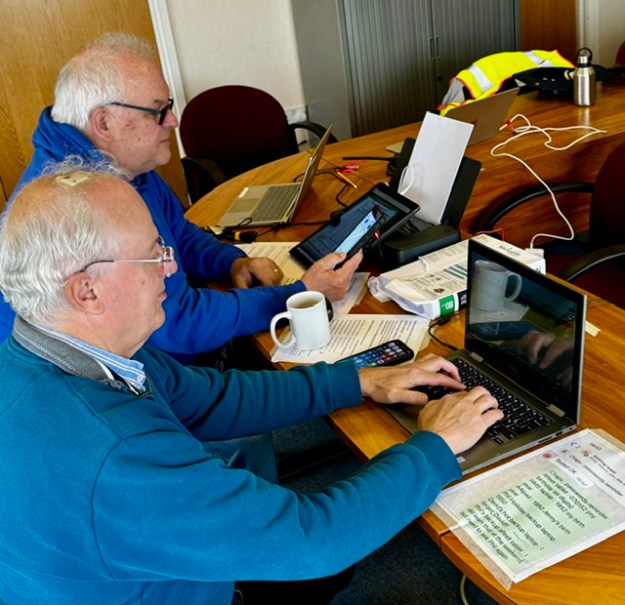
This photo above is a snapshot of the World Championship Scoring Office. The essential neat, orderly collection of filed paper documents are out of shot to the left. You’d be amazed just how important that is. I was. The amount of kit might surprise some of you.

Scoring a large Championship will be pretty simple, correct? What can we see here?

….Plan for every eventuality.

Our Worlds hardware configuration had to be cleared and locked away each night for security so all our kit had to be ‘compact’. If anyone walked off with the kit late at night, you’d have a grade A disaster on your hands. Kit lived on-site and was never taken home in a scorer’s car, for example.

Let’s start with the easy part first:-

Laptops.

We had four. Honestly we had long periods where all four were in use. More on why this was, later. We used a Macair dedicated for Standard Redress modelling, and three (!) for HMS Excel. Of the three Microsoft HMS laptops, two were Windows 11 with Office 365, one was Windows10 (our PRO reported very stable HMS performance on Windows 10. )

Printer: –

Let’s start with the final product first. Essential for the designated posting of Results is a printout on the Notice Board. We borrowed from Jim a simply beautiful piece of kit. For printing we used a battery driven, very compact, HP200 printer. It could run on mains or battery. Utterly brilliant kit. Must get one. You need to carry a supply of spare ink cartridges and tons of paper. The printer was essential to our result audit process too.

Just to illustrate the notion that if anything can go wrong, it will do so at the worst time….. At the IOM Nationals we ran out of black ink just as we were about to print the final results for distribution. Carry two sets of backup ink, if I were you. We had a conventional backup printer normally for the Race Control Van. If pushed, we could also print in the Clubhouse Admin Office. If you cannot print your results, it’s “game over”.

On the first scrutineering day at the Worlds, I arrived at the Club to find a regional power outage. No power. One in a thousand chance, right ?? Well, with our kit and battery printer, scoring could keep going in any event.

Tablets :

We had four Afleet tablets on site, our primary two were matching, ruggedised, waterproof etc. We also had our scoring coach with his Afleet tablet in New Zealand. We shall tell you later how we always had two tablets constantly on “live” with current data. We eventually figured that if the Clubhouse and all the kit was wiped out, the Championship could continue to be scored from New Zealand.

We used a brilliant A4 sized iPad Pro for electronic receipt of score sheets and umpire documentation from the Finish Line. It was flawless. If it had a failure at any point, it would take about 2-3 minutes for the paper documentation to arrive in the Scoring Office. We could also pick up the electronic copy of score sheets via the Afleet tablet if we had to.

We were making heavy use of WhatsApp and if it failed, we could switch to Signal for the same functions.

Storage :-

Our primary ‘disk’ storage was always USB sticks, not the hard disk…. so that in case of trouble we could jump straight to our hot standby laptop. We had three USB sticks – all double ended bearing both USB-C and USB2 connectors. They were very large GB too. We shall write more in a separate article about how data backups worked. We held all our data at three levels of storage.

Wifi Routers:-

We had two (eventually three when satellite arrived). Our main 4G Router (and the satellite router) was mains powered. Our backup 4G Router could run off mains or battery. In the photo foreground, that unit with two little ears sticking up was our primary 4G Router.

Power :-

We had enough chargers frankly to charge anything regardless of ports.

We had extension leads with power-surge protection.

In case of really long power outages, we had three 13amp battery power supplies on site and ready if we needed them. We could probably run for a couple of days on even just one of those.

We stayed in touch with the Race Course happenings by having a VHF Radio in the room tuned in to Race Team internal announcements.

Protect your Club Reputation.

Plan for anything and everything.

HMS – Scorers of the World Unite ….!!

HMS, or rather HMS Excel, has served our sport really well. It is a great asset and it’s in all our interests to get the most fun and service from it that we can. For myself, I’ve used it at every event I’ve done scoring duty. From a design viewpoint, I adore it.

It does have some interesting foibles though. Little streaks of character that show through occasionally.

Why would MYA’s very stable and mature scoring system start throwing up errors which weren’t there when it was originally tested and launched? The answer, of course, is that between HMS and the laptop CPU processors are layer upon layer of Excel and Windows. They are changing and updating all the time.

There are some terrific User Guides – 2026 editions from GB especially. If you’ve not seen them, then print them out from MYA to keep. They are great pieces of writing, but don’t quite (for me) have enough on “common things that can go wrong”. I don’t know why we don’t have a little online User Noticeboard where we can post our hints and tips to share between Clubs. Otherwise what happens mostly for me is someone leans across my shoulder and says, “I don’t do it that way – have you tried this??….”

So – our “starter for five” tips ?? If you email us at the website with experiences and suggestions of your own, we can add them here. Here are my favourites:-

1/ Sorting

In number one position for me is sorting the score table.

Just sometimes ( 2 in a hundred?) you can glance at your score sheet and coincidentally notice the boats are not showing the correct sequence, but scores are correct.

I know that the spreadsheet says it will do a sort of the results when it prepares to “Display for Print”.

But it doesn’t about 2% of the time. Life carries on, but it’s pretty embarrassing when you print out a pile of results to hand around the bar and the finishers are not listed in the correct order.

All you need to do is get into the habit of clicking the blue sort button on column 1 (“Pos”) before you go to the print options. Do it as frequently as you like.

What’s the cause? I’ve no idea.

2/ White Screening

At a couple of Events, I have had the new Windows/11 laptop go into “white screen” with HMS Excel. Everything seems to lock up. Sometimes you can force Excel to quit, sometimes you can’t. Usually a full forced re-boot of the laptop is what you need.

We get the feeling it’s some little problem (shortage of storage for example?) that seems to accumulate within Excel as it remains open.

What to do?? Each time you finish scoring a heat:-

  • issue a save
  • close excel down using the big X
  • reopen a fresh excel ready to score the next heat.

I have scoring buddies who say it’s sufficient to close the spreadsheet (leaving Excel open) and then reopening the spreadsheet. …. Hmm not so sure. It takes the same amount of time to close Excel and reopen it afresh. I’d suggest do that.

What’s the cause? I’ve no idea.

3/ A single WDN/NSC/DSQ/RET Decision is to be Processed

– the HMS heat score table ending up out-of-points-sequence

Let’s face it, pretty frequently one is told about a single DSQ/NSC/WDN/RET decision AFTER you’ve entered the score sheet into HMS.

We all know to run WDN competitors as DNC until they drift down to bottom heat – and even then only when PRO and Board Manager agree – as it can drive a fleet reschedule decision to be evaluated.

Know now – this area can be hazardous…. At our Club, we have spent a longtime looking at these.

The great thing is ,if at your event, the score-entering is lagging slightly behind real life. If you’re right up to date with data entry, NSC/DSQ/RET/WDNs can arrive after you have entered the results from the score sheet.

a/ If you are running behind

the heat score sheet may show NSC/DSQ/RET/WDNetc in the middle of the list. DO NOT enter it like that into HMS like that.

To be safe, what you should do is enter NSC/DSQ/RET/DSQetc into HMS after the last finished boat of the heat.

What you are wanting to see is that the sequence in the points table is in tidy ascending order as you cast your eye down the column. We think you want to eliminate any chance that HMS Excel will attempt to do a “sort” on that column to tidy it up.

b/ Your data entry is smack up to date

Let’s suppose that you do indeed enter everything from the heat score sheet as presented and you maybe have a NSC or DSQ in the middle of the list.

Honestly – I know it’s fag, but stop right away. Rekey all the numbers from the impacted boat downwards, in that particular heat, to get the NSC/DSQs etc down at the bottom of the list. I know it’s tedious rekeying a ton of numbers, shuffling them up one row each. Believe me, just do it.

What’s the cause? We don’t know, but we suspect it’s avoiding HMS Excel doing it’s own sorting.

4/ At a large Event, Multiple NSC/DSQ/RET type decisions for a Single Heat arrive at once

This is tricky. It feels like (3) above, but maybe it has a problem type all of its own.

Our feeling is that you need to process these into HMS one at a time. Do not enter these adjustments as a group.

Our little local method which seems to keep the Doctor away, is to enter one adjustment then enter the Print sequence, but exit print again before going to paper. Then put the next adjustment in.

What’s the cause? Well … as a group of programmers we have our theories … but really we have no idea.

5/ Altering the Print Layout as the Event Progresses

It’s tempting as the scores pour in to think you can improve print legibility by adjusting margin sizes, flipping between portrait and landscape etc etc

Don’t. Just don’t…..

Leave it to the authors of the HMS spreadsheet and leave it alone.

Let us know your Hints and Tips by contact us via the “Contact” page of this website.