
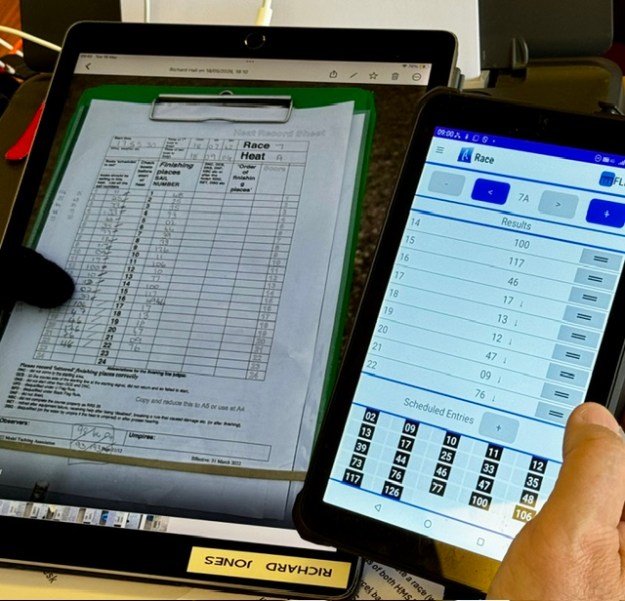
(A4 sized iPad Pro receiving score sheets fromThe Finish Line. Note this means you automatically have backup images of all your heat score sheets as they come in. Safely stored in your WhatsApp group.)
You cannot get half way through the Worlds, then lose all your data.
It maybe will surprise the uninitiated path you maybe spend more time “backing up” than you do entering scores. It’s a big deal.
We held three levels of race data:-
1/ On USB sticks (double ended USB-C and USB2, so you can plug into just about anything), we had our Current Data. Keep this folder neatly filed inside subfolders as you go.
2/ On the hard disk of our HMS primary lap top, we held our first level of data backup.
3/ The hard disk would automatically back up (if MS Cloud was working!) into OneDrive. All scorers and Officers were authorised to access the cloud folders.
We had two times that we did backup processing.
1/ At the end of every heat (so about 3x an hour) we would backup the three device layers above, being very strict about naming conventions. (more on that later)
2/ At the end of every race, as A heat had been entered, we would send a set of backups out via email to all the scorers and Officers in case of a proper disaster.
Naming Conventions :-
As we had different scorers on data entry duty each session , it was important that we all used the same naming convention and backup routine. We used a great concept from Andrew Crocker who was the Scorer at Gladstone.
- the current heart was always named “current heat” and not by its heat number.
- as we saved the backup, it would be named “heat 3b” , for heat b race 3 for example –the same in all layers of storage.
- for extra security against gremlins, we wanted to build in a fresh close/reopen of excel as we proceeded.
Were found the quickest most foolproof way for heat backups was
1/ While in “current heat” , hit the little purple diskette icon (“save”) at the top of the excel spreadsheet
2/ Select “save as” and change the name from. “current heat” to “backup heat Nx” eg 3a, as you go. Save in the USB, and then on the hard disk.
3/ At this point your live spreadsheet is called “backup R3d” for example. Not what you want, so CLOSE excel completely and then go and find “current Heat” and re-open it. You are now ready to score again with a hopefully fresh excel.
If it is the end of a race (end of heat A), do all that, then email via outlook your “backup heat Nx” file to a list of the scorers and Officers. Your disaster copy – that should be your “Get Out of Jail” card if everything blew up.

