Tag Archives: ten rater

IOM Worlds : Scoring, Assembling a Team……!!

Every year, radio sailing will have a large World Championship running somewhere. We found that not much definition of “how to do it” gets passed on from one generation to the next.

The thing about Scoring a large one week event, is that it’s NOT at all the same challenge as scoring a weekend event,…. “but only bigger”….

Honestly – entering the scores is a tiny part of what needs to get done.

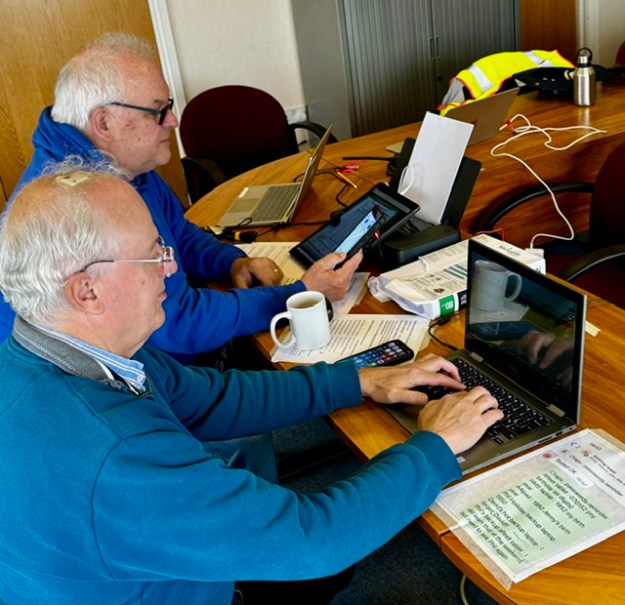
The number of people who will volunteer to help, may be what you need…. may be a different number. “Unbelievably” at the IOM Worlds we had a roster of 5 plus one subject matter expert on the phone all day from New Zealand. I most often score a weekend event, with one person – me.

So why a larger team?

1/ Venue layout. Not the same as normal racing at Datchet – these Datchet Worlds courses were widely spaced out. There were issues as to the where the Race Control Van could go. We had to think through our primary objective of always having a Scorer at the line, and how/where we got the Scoring processes done. It’s not going to be one person. We figured and tried a minimum of three. Not enough. Entering Scores is not the biggest part of the job.

2/ The BIG Thing….. If it’s a large scale, one week, championship you need enough people to cover the fact that most volunteers have to work weekdays for a living. You need at least the minimum number of people every day. You also have build enough scorer capacity to cope with a team member falling sick, or cannot get through traffic etc. TIP : Build a roster and publish it. Try on any day to roster your minimum number plus one.

3/ if you are missing a key team member contribution, you must have the ability to keep going.

We needed at least three scorers on duty on any day. We had five volunteers to cover this, plus a subject matter expert on the phone. I took everybody. Good job we did. There were plenty of hours where we were all flat-out working. The workload arrives in waves. We took no lunch breaks either. Eating/drinking was on the hoof. Don’t mention “Standard Redress” processing either.

If 5 people stand up for the job, naturally different skills can be brought to bear. If the daily number on duty varies from 3 to 5, you cannot really have a set role per person. Any team member must be able to do any role. So what you do, is not assign roles to each volunteer. What you do is document your key processes, then “Staff the processes”.

It’s important that key processes (eg backups) happens the same way each time no matter who is the duty scorer assigned to do it that day. Document the processes. More on that in later article.

Special contributions:-

It’s surprising/delightful what people can give.

1/ It turns out that most frequently used “asset” the scorers produced was our chronological filing library. Our ‘Runner’ role in addition to ONB and document transport, was defined to also complete our librarian function on our behalf. Honestly it was SO useful – Race Team, Umpires (checking their own decisions!), Board Managers would come in on-spec and inspect that file. We started with score sheets and results in one folder and umpire paperwork in another file. It needs to be on paper no matter how many laptops you have. Our librarian quickly realised that separate filing was wrong – file all that together in ONE time-ordered folder. This folder became so large that it eventually filled TWO lever arch files. We also had to keep “parking lot” issues on large flip charts on display for all to see. Vital as it turns out – for ticking off completed tasks.

It’s a big deal.

We had one team member who admitted he was technology averse – and he built and maintained all of that for us. Brilliant.

2/ Our most valued innovations often came from RH. He was fantastic. A process genius. Professionally ? He is a Schoolmaster….

I now see that the key skill of a Schoolmaster is to organise work so that even a group of recalcitrant teenagers will manage to complete it. RH gave us the most profoundly simple methods and they helped the team to a ridiculous extent. The way we laid out our work area, the way we named our backups, we way we built our crib sheets (and where we placed them), how we processed paper arriving in the room…. and really critically, RH (very fit) built a process tick sheet for a duty scorer being out at the line, as the Scoring Office representative…. It was with always him inside a waterproof cover and ticked off as racing progressed. As a Six Sigma process guy, I was stunned. Amazing.

So – for your Championship at your Club, if you need to build a team:-

1/ Define and Document your processes first. Then find people and staff your processes on a daily chart.

2/ Find what skills you have between the team, and use them to their best effect. People can give a lot. If they feel they can challenge the most obvious, then that’s the best you can get.

3/ Rotate the team members as much as you can. Give them all a “go” at all the processes. Not always possible, or easy, but give it a try.

Good luck with your forthcoming Championship !!
IOM Worlds : Scoring is Easy – What Could Possibly Go Wrong….??!!

Scoring is easy right? What could possibly go wrong?

Actually scoring really is easy when everything is running smoothly. The challenge for any Club is to know how to handle scoring affairs when something jumps off the rails. As it probably will.

Let’s set aside the morning during the Nationals that my car sunroof spontaneously exploded while driving and showered me with glass. Thankfully not on the highway at speed. However, at a Championship that you might run, just know how your team will cope with a member not arriving for any reason.

The Systems:-

We have mature, proven scoring platforms out there. At the Worlds, we had great (new) hardware in duplicate and triplicate.

This website contains other material about protecting your Club reputation from conventional hardware glitches. There will probably be some. Did we get one of those? Yes, we did.

We had Windows 10 and 11 systems in use. Our PRO had advised that his Windows10 system (goes out of support in 2026?) was very robust. Consequently we had our additional Windows10 system running on nice Dell hardware – nice until in the middle of scoring a heat, the battery gave out. Honestly, we had to run to find screwdrivers small enough from the K7 van. It was “back off” time for the Dell. The Team did a great job of sorting that out while HMS Excel scoring continued on the HP. In an hour, it was back on the air.

The team was far more concerned about software issues, and luckily our team had a Microsoft professional on board. We needed him!!

First off – let me say that I have used HMS Excel at every regatta and championship I have ever scored (3 years, including 3 Nationals and now the Worlds). I adore the product. I love the thing. It comes from an era which is probably the last time that I felt that I understood what was going on in the technology. I’m from the “life is a spreadsheet” generation.

Designed and written by some very gifted and talented people (Henry Farley et al), it’s really very clever and does the job. Used all across the UK, and in plenty of Clubs worldwide. It’s reasonable for us all to think it has been used so many times, is so stable, that it’s the way to go.

We have to remember though that when you press the button in our Excel spreadsheet, over 90% of the machine instructions that get executed are outside the spreadsheet. The executed instructions are mainly in Excel 365 and Windows 11. On our system, the operating system and Excel are updated by microsoft every 20 days or so. It’s actually a very dynamic environment – constantly changing. Not stable at all.

Good advice from the PRO was to have Windows 10, but that goes out of support soon. So we did what seemed natural – and had both. One laptop for each.

The general direction with Microsoft is that going forward if your application was not distributed through the MS App Store (read “fees and costs”), it could be unsafe. They don’t like VB macros or Active X code. HMS has loads of that. It’s what makes it special.

These days, if you buy a new family laptop with Windows 11 Home edition (we have an HP), it comes with Safe-Mode (“S-Mode”) already enabled. You need to switch it off to run HMS. It’s a one way process and no going back. You’ll think twice before doing it. Probably when we all see windows/12 come along, it’ll be even tighter. They don’t like VB and ActiveX. We reckon no family wants to do that switch off process with their household laptop. The general drift will have to be toward dedicated HMS laptops as the years wander by. No problem – but someone needs to think about that trajectory and how the sport best caters for it. Not impossible at all.

Graham Bantock has advised me a couple of times that if you get an HMS software problem, the first thing you notice is that people will tell you that it doesn’t happen on their system. Never a truer word. So how did we get on??

1/ Going back to 2025, we have had a few “white screen” moments on Windows/11. Everything locks up. To get passed it at first, we did complete system re-boots (2-3 minute delay?) which seemed to fix it. We now suspect that simply forcing Excel365 to quit and then restarting the spreadsheet is enough. At the Worlds, we built this close/reopen of Excel into our backup process (suggested originally by Andrew Crocker) at each heat completion. The problem didn’t come back.

2/ MS Cloud Failure :

At our Dress Rehearsal, the IOM Nationals, we had our first big challenge for our HMS Excel setup. We were running on Windows/11 and suddenly we couldn’t communicate. No email. Then we realised that MS OneDrive (MS Cloud) had gone down. It stayed down for 20 hours. Naturally, we thought it was something we had done, but after 20 hours it just popped back online again. . A minor impact was that our third level of data backup ceased working. …OK – no big deal…. The huge thing for us was that we were sending results to the event webmaster via email. So we could not get results to him. It seems that on Windows/11 and Excel/365, the Outlook mail server needs One Drive running as it seems to keep its contact folders (or something) in there. No Cloud, so email stops.

After two hours our Microsoft expert found the circumventions. (a) the problem did not occur on our hot standby laptop with its Windows/10 system – see PRO advice! (b) it was still possible to use the mail service via its own dedicated email website portal. Still – it was a fight to figure this out and STAY SCORING for a couple of hours.

3/ Visual Basic Error 1004

This was our big one. Life threatening stuff. My medications were at home!!

We had a wave of after-the-event Umpire decisions arrive to apply to the scores already in the system. Nothing complex and we had sixteen heats already inside HMS. How many results is that? It’s about 350 boat scores. We made the umpires’ alterations – nothing we haven’t done before many times and suddenly we got “Visual Basic Error 1004″… telling us to log in to VB. Multiple attempts to get past this point kept locking up with Error 1004 – but with varying messages.

If it had happened later in the regatta, maybe after five days, it would have been a “game over” moment.

HMS Excel, or any system, doesn’t get used often at the maximum 84 boats level. With this combination of Windows/11 and Excel365 we could quite possibly have been the first. Anyway – we were stuck at sixteen heats and simply nothing would go in. Properly stuck.

(As a team with four software guys in it, we had a feeling as to what the Error 104 was getting at. For sure, our theory will not turn out to be what it was, but we shall write about it later on this website.)

In a somewhat religious moment, I spotted Graham B right outside the Scoring Room door. Graham’s amazing and very, very calm… and a World authority on HMS. Honestly – It was like being knocked down by an ambulance.

Graham listened carefully to our problem description then simply said, “You need to speak to Lester”. We called Lester straight away. God surely does exist as Lester answered immediately.

Lester’s advice was that when Error 1004 starts, it never, ever, goes away. You have two choices – step back through the backups until you find one that works (takes time), or… bite the bullet and go right back to an empty spreadsheet and start all over again. Enter the Umpire decisions in the normal in the normal flow and not after the event. Enter those 350 results from the beginning.

That’s what we did. The Commodore stepped in to help me reload the entire regatta to date. The team carried on scoring into the Parallel System. It took around two hours to diagnose, re-enter and check – then catch up with real time.

Frankly – I thought I was going to die. Stress is hardly a good word.

That’s what we had a parallel system for, of course. We could switch across at any time and keep going. In the heat of the moment, we knew how all that was going to work. However, we had not thought out an approval process to permit the scorers to dump one of the scoring platforms and keep going on the other. Interesting.

At this moment, we still had around 4-5 days of Championship to go. So what did we do??

1/ We booted up all three Windows Laptops, full time.

2/ From this point on, we ran two full HMS Excel systems in parallel, plus the Afleet system. We named our laptops “HMS Primary” and “HMS Secondary” and carried out our documented process flow as normal. The team were fantastic.

3/ We permanently had our third Windows laptop switched on as our “lab rat”. If we had any late umpire decisions, or anything of that ilk, we separately tested each of them singly on the lab rat before applying them to the main systems. When we eventually came to apply all the (eleven) standard redress awards on the penultimate day, they were all tested one by one on the lab rat before applying to the two main systems. Takes time – but we survived. Processing the Standard Redress awards, checkingand testing them took at least two hours. There were complaints that we were slow getting results out. I could have murdered anybody who came in and tried that on me.

We did our Standard Redress modelling on a separate MacAir system.

Now : as you know we have been all out, all year, to be extremely even handed in our support and appreciation of the two fabulous scoring systems we elected to use at this Championship. All you HMS Excel fans will be wondering if our team could now list ALL of the problems we had scoring this 84 boat, 6 day event on our AFleet tablets. So here they are, listed chronologically:-

.

.

.

.

.,

.

IOM Worlds : Parallel Scoring – 1 …Why Even Bother..??!!

At your Club, are you heading towards hosting a large Championship soon?

Obviously when you’re headed towards hosting a Worlds as we were, you start thinking about the BIG questions a year or two ahead. You’ll know already that Datchet tried to always have at least two ways to do any single job at the Worlds. Does this approach apply to Scoring?? … Hell, YES !

What are the really big questions to consider in Scoring? Well, for a start you have 84 people about to arrive who have spent a lot of money to come and race with you for a week. At the end of the week, or at the end of the Championship, regardless of the week they had, they ALL want to see their name on that Results Listing.

Yes – On that last day, 84 “experts” will all gaze at the beautiful printout that you have pinned to the Official Notice Board. They expect two things –

  • it’ll look smart and professional and their name was correctly spelled
  • It will have precisely ZERO errors on it. If they find an error at that point, especially in their own score, your name will be MUD. The subject of clean results, as it happens, is a whole new thing if you Parallel Score.

Reputation Protection – The Big Issue:-

Selfishly, for your Club you should be thinking of protecting the Club’s Reputation. It takes years to build up a reputation to be considered anywhere near “capable”. As we all know from 2025, you can destroy Club reputation in a flash. Reputation takes years to build and just minutes to destroy. If Scoring were the perceived failure point, it’ll take less than a few minutes to destroy. It’ll be talked about (with sniggers) in Club bars across the world for years.

Within Scoring, everyone will tell you “it’ll never go wrong”. …. “one in a thousand chance…” etc.

Don’t you believe it. What would you do to protect your Club Reputation?

In considering Parallel Scoring, we would consider it :-

  • for a 30 Boat Event? …. Probably, No
  • For a 45-55 Boat event? … Well maybe
  • For a 55-84 boat event?… Yes, for sure.

A simple way to think about it? If the scorer or scoring system fell over on the Penultimate Day, could the Championship recover by some other means – even paper scoring?? If you have already entered a couple of thousand boat results, just think what it means.

In 2024, we made the decision to score our various upcoming Championships into two separate scoring systems at once. We called the technique, “Parallel Scoring”.

Not simply having hot standby laptops and USB sticks…. but two systems at once.

Does this mean double the work? NO.

Are there surprising benefits? YES!!

Which two scoring systems? Everyone wants to know. Regardless of if you’re racing to HMS Rules or SHRS Rules, you should first think of what volunteer skills and platforms you can access locally. Start there.

At our Club we had people with knowledge of three scoring systems for heat based racing – the MYA’s HMS Excel, HMS on AFleet and HMS on Andrew Crocker’s brilliant Fleetboard. These are three really good scoring systems. We were spoilt for choice. We shall write more on the website later about why we chose what did …and probably it will not be for the reasons you expect. …Start with the volunteers you can get and the scoring skills that they have.

Consider the technology skills you might need too – I was keen to have a team member who is a Microsoft Professional for a living. How fantastic that turned out to be.

When you choose both your scoring systems, remember that if the two systems do not run on entirely separate technologies…. there is really no point.

When you later read our analysis of the things that can/did go wrong, you’ll fully appreciate the depth of the issue and separate tech.

We felt it natural to choose HMS Excel as our primary system and then Afleet as our Parallel System.

We decided with the PRO that unless we had a catastrophic situation, official results would simply always be from our primary platform – HMS Excel 2022.