Tag Archives: ten rater

Radio Manuals – PDF Downloads or Online Websites…??

If you use any of our transmitter manuals for radio sailors, you’ll know that we did all our basic manuals (and one of our advanced manuals) as pdf downloads. Very popular they were too. (about 3650 or more downloads as I write in July 2026).

Then we did our more advanced featured manuals for Radiomaster/Futaba/Spektrum…. they have been popular, but nothing like the usage yet as the pdf download manuals.

So as a little test we decided to offer the Radiomaster Advanced manual as both a PDF download AND its own website.

Astonishment – the pdf download is already twice as popular as the website …. 650 downloads already.

OK … give us some time and rainy days, and we might put the work in to make the Futaba and Spektrum Advanced manuals available as pdf downloads as well.

If you have strong opinions, just email them in to the website via the contacts page.

Come and Try Radio Sailing ….!!!

Do you fancy your hand at Radio Sailing?

The Club is running a taster event on Saturday July 11th. Everyone welcome!!

For Event and Booking Information see the main club website at

http://www.dwsc.co.uk/events

or email us at the Contacts Page of this website.

HMS Hack – Column Names ….!!

At your Club Events do you ever have a need to have your HMS Excel results show anything other than the standard columns??

  • maybe in a non-English speaking country, you need different column names
  • if you are running youth/female/age-group leagues as sub-groups of the event
  • you are expecting a lot of overseas visitors and it makes more sense to show Country codes than Club Names
  • in your country you need to show “Association Number” but not have it named “MYA Number”

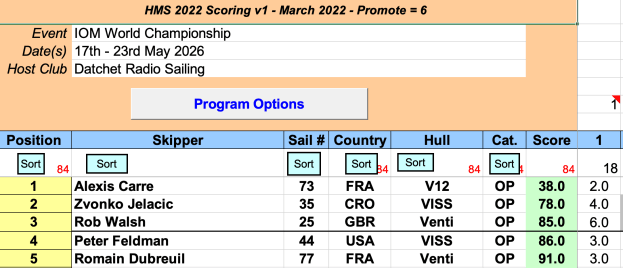
It’s not something that comes up in the normal run of things at a Club, but in HMS Excel, it’s quite easy to make such changes. In the Example above from the IOM Worlds, you will see that the Race Committee decided to show 3 character country codes where “Club/City” normally resides. They also decided to use the column which defaults to MYA Number to record Age Categories – Under 25, Open, Master, Grand Master etc.

How?

When you set up the spreadsheet ready to load the entry list, you can simply click on the pale blue coloured column headers and change/over-write the column title to anything you want …and click “save”.