Tag Archives: London radio sailing

What’s The Wind Doing at The Club?? Do You Wear an Apple Watch ??

Wondering what rig you should use today ?? There is simply no better option than looking at the windsock and figuring it out. Do you carry an anemometer in the car?? It’ll sound mad, I know, but I’ve kept one in the car for about 20 years. It cost about a tenner, so it doesn’t owe me anything! The windsock plus an anemometer is great !!

Then I discovered this, on my three year old Apple Watch.

I don’t know how many of us wear an Apple Watch. Quite a few…. Probably at least Apple and Samsung watches can do this trick.

In the photo above, that’s the wind speed and direction at our Club (Datchet) right now. Gust speeds when I check them are usually double the stated number, so easy to remember. So right now it’s 17mph gusting 30-35mph. Quite a lot!

If you have an Apple Watch and this is news to you, like it is to me, then this is how you do it:-

  1. Go to your main Apple weather app which is on the phone when you buy it by default. The icon is a weather cloud with the sun peeping out behind it.
  2. Make sure your Club is a chosen, selected and stored location.
  3. Now go to the Apple Watch app and do two steps

Go to the Weather app that is INSIDE the Apple Watch app. Select your club location from the list. At Datchet for example, I use “Heathrow” – see above.

Ok – now the weather app is set, all you have to do is display it on the watch.

  1. Most watch faces have little gadgets or widgets, but for the watches they call them “complications”. Obviously the tech people created the name before the marketing people could stop them. Probably whatever design of watch face that you have selected in “my watch” will have two or more complications available. In my example above, I am using the California type watch face. You can see at the bottom that two complications are available. I’ve decided to use the “sub-dial bottom” complication for weather.

If you click on that sub-dial field, you get offered a huge choice but page through to “weather”.

There’s a good few options even for “weather” and select “wind”.

And you get the watch face you see at the top.

A Small Improvement in Battery Storage….!!

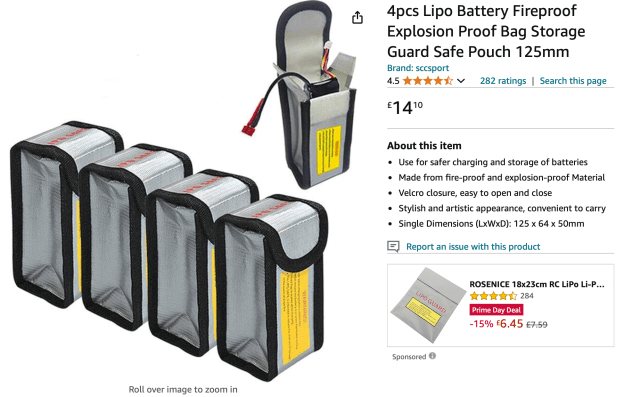
Nigel B recently showed me a very neat little battery bag you get from amazon.

Actually you buy them in bags of four at an embarrassingly low price. You can get two or three 2-cell LIPOs or LIFEs in there easily.

I’ve been wanting to neaten up and smarten up my battery storage recently. These things are ideal, because of the outer bag that I use.

It keeps all the batteries in neat little pockets so that during race day it is much easier to remember where you are with power supplies. I reckon I could get another four little bags and then easily store 8 of them inside my outer bag. Very neat and tidy.

All inside this single outer bag. You could easily store 20-24 batteries in there very neatly, bagged boy connector type maybe.

Thank you, Nigel!! This was the Amazon page…. £14 for four.

Spektrum Tittle Tattle….!!

So that we could write our Datchet radio sailing manuals for all the Transmitter Brands, I went ahead and sorted out trying them all.

In asking around, you get positive and negative opinions (passionate usually!) about all of them. When asking around about experience with Spektrum, more than once I was told that the kit had to be abandoned due to boats falling out of range. This was naturally accompanied by the views of others saying “used them for years, never had a single problem”…. (more passion!)

Of course, a boat can drop signal for all sorts of reasons – transmitter, receiver, carbon fibre, battery etc, but when your much respected friends say they had a problem you pay attention, don’t you? It might be the transmitter, it might not.

So I went ahead and bought a new Spektrum DX8e (on special offer, I might add!!). Before even hooking it up, I managed to break the thing – entirely my fault, by the way. So RW took it off to see the Spektrum doctor for me.

What was interesting was that RWs Model Shop (AL’s Hobbies) knew straight away after repair to give it a range check. I’m thinking they knew what to look for. They promptly sent it back to the distributor. It only took a couple of days to turn around.

The diagnosis was a faulty battery connector which had to be replaced. It was all so quick I’m thinking they had seen all this before a few times – a big batch problem maybe.

Anyway, if you have set aside your Spektrum after losing contact, it may all be to do with a suspect battery connector. You might want to get that looked at.

I’m grateful to Gary at AL’s Hobbies for sorting mine out 🙂