In fact, a couple of the Datchet guys are working more with this idea now. It requires 101% concentration, but you can see the attraction.
Craig has it set up on his Spektrum. To do it similarly on your Radiomaster or Futaba transmitter is another variation on the “Advanced Mainsheet Management” sections of our online Radiomaster/Futaba radio sailing manuals.
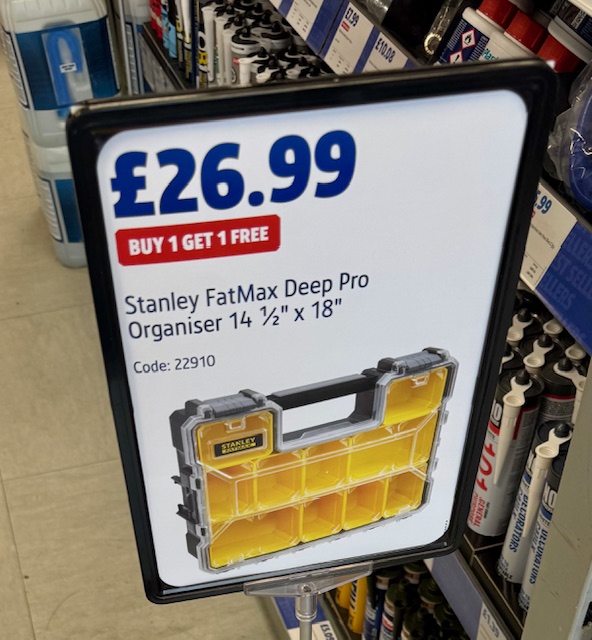
You have to watch the prices in Screwfix like a hawk !! – sometimes they have the most amazing offers. I was in there this morning and saw this ….
Did you notice in small print, it’s 2 for the price of 1…..!!! £13.50 per tool box.
If you’re new to radio sailing, and most probably have come from another branch of the sport such as dinghy or keelboat racing, you’ll try bringing your old toolbox and tools with you. I did. It was quickly a hopeless venture 🙂
In the radio sailing part of the sport, we have special tool and toolbox requirements.
large variety of bits and pieces, usually smaller sizes
unexpected calls on the toolbox for a huge spectrum of reasons, usually in a hurry, often in the rain
tools/parts smaller and often more delicate.
no rummaging, a need for speed, a protected environment for delicate things
Out goes the big keelboat toolbox! No rummaging under the spanners plus we need to see where all the bits are at a glance.
RW and Rj got stuck into this subject last winter, but neglected to publish the results. We tried for a short period those toolboxes with cantilevered fold out trays. Such boxes around here are of appalling quality to be honest, plus we didn’t want to swing out the cantilever trays in the rain and everything gets wet all at once.
Conclusion:-
lots of nice small sealed trays is a good thing
Reconfigurable trays is an excellent idea
clear windows so you can see what is stored where in about 1 second flat, all in the car boot !
weatherproof and probably not metal construction
solid, sturdy, high quality but not costing the earth
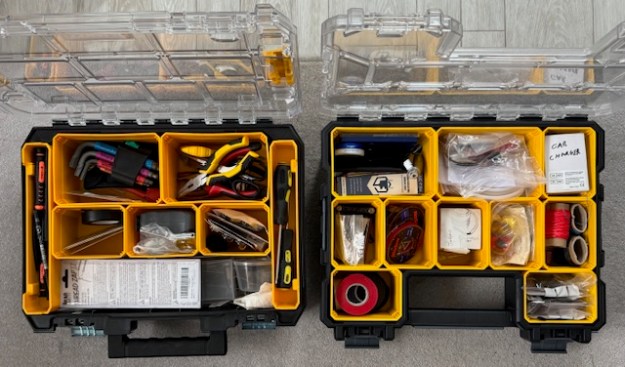
We ended up testing two almost identical products, same dimensions almost. In the trade they seem to be called “Organisers” not “Toolboxes”. Both brands feature little locks on the sides to enable you to stack one on top of another securely – might be a consideration in your car boot….
In the end, RW and RJ concluded that the Dewalt model (left of photo) is slightly better. Note the long side compartments for screwdrivers, pens etc. Note also that the Stanley model (right of photo) places the handle grip in an area, where in the Dewalt you can remove the storage compartments to get your 12 inch rule, surgical tweezers and long things in.
This is the Screwfix Link to the Dewalt offer of the month.
When we did our trials, the Dewalt was £40 and the Stanley was £20. RJ and RW quickly agreed that the Dewalt was best for radio sailing and, I think, despite the extra price RW has four of them!! Really sturdy, high quality, each very visible compartment is sealed when. the lid is down.
For myself, I’m using both and find I can carry tools and spares for 3 classes in two of these boxes. So I’d say £29 for the Dewalt is great – but that’s until I saw £13.50 for the Stanley.
What do you think?? A good opportunity to sort out your tools and spares?
Screwfix tends to have short lived offers. Move fast if you want a couple.
Did you see our “hack” toolbox for carrying your Futabas safely??
We have had lots of Club chatter over the months/years about radio range, losing signal to the boat and so on… the merits of different transmitter brands etc. Remember, you can lose radio contact with the boat for SO many reasons.
You’ll all know that Flyers in free sky find they get simply massive radio range and quote exciting numbers stated in whole kilometres – 10 km not being unusual.
What range do we need in radio sailing? 100m maximum I should think. Nonetheless, “who gives the strongest signal and furthest range” continues to intrigue us.
We have had Club members trialling ceramic antenna based receivers (no dangly wires) from Spektrum and Radiomaster ELRS. These dinky little receivers are great in a sailboat “pot” with zero wires from a space management viewpoint. They were though designed/optimised for indoor car racing – all very different. The Futaba equivalent wire-free receiver actually states a maximum 70m range, so I’ve not bothered to test it.
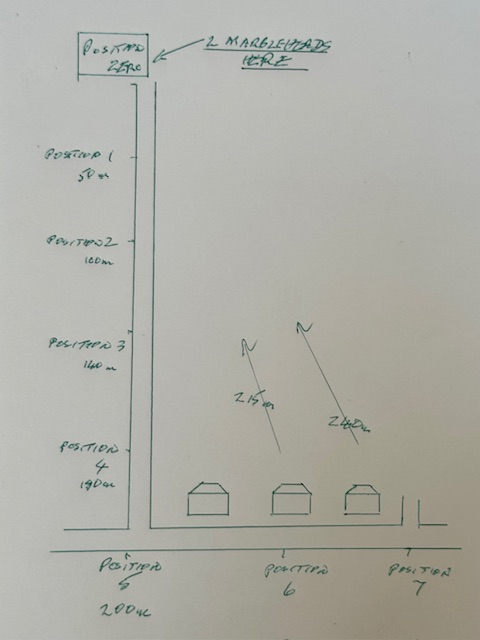
A unique combination of circumstances came up this morning. Two identical, carbon fibre hulled F6 Marbleheads, one with Radiomaster TX15 and ELRS (ER3Creceiver). The other rigged with Futaba T10J and their cable antenna F3006SB receiver…. fitted in a SailsEtc antenna frame that tucks it neatly at the pot top,… wires at 90 degrees as recommended by Futaba. …Plus no rain!! …Plus a spouse who was willing to help by watching boats out of the kitchen window (very rare treat!). All batteries were fully and equally charged. Transmitter power/strength settings, transmission packet rate, were as they were to-of-the-box and new.
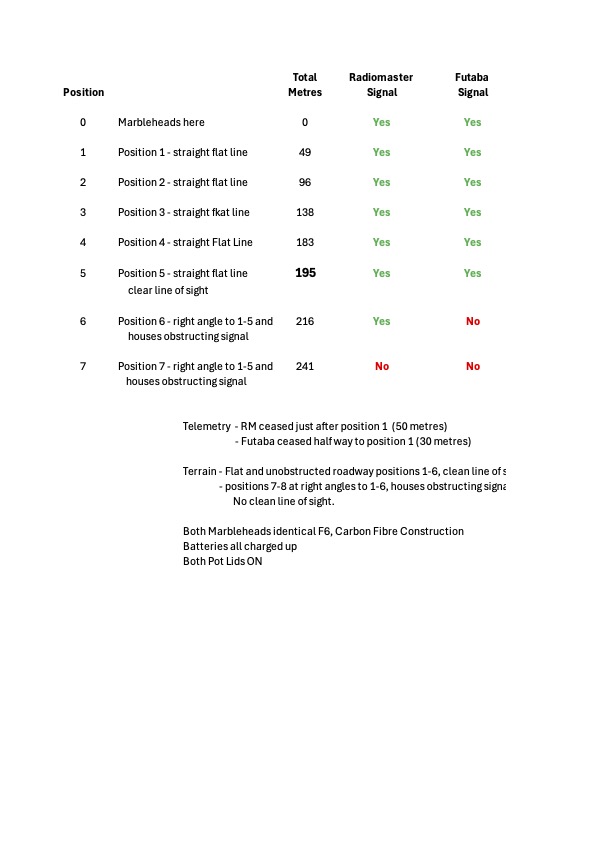
We sail on dead flat reservoir water, so with a solid surface beneath us, not free sky. Clear line of sight to the boats, no obstructions. Today’s tests, Positions 0-5, were similar really – carried out on a dead flat street, 200metres long, with line of sight to the boats. Then the next two measurement points I had to turn 90 degrees at the the road junction and walk along that street (measurement points 6 and 7). Measurement points 6 and 7 therefore lost line of sight, and gained a couple of houses in the way of the signal…. they were quickly more challenging to the radio, but I wanted to see which brand gave up first, and was it actually a “close thing”?? Measurements stated for position 6 and 7 were direct back to position 0, as the bird flies.
Measurements were taken via What3Words and a website named grid reference finder.
Conclusions
Nearly exactly the same range for Radiomaster ELRS and Futaba, around 200m. Easily enough for radio sailors and probably double what we might usually need.
Radiomaster lasted maybe 10% further (20m) than the Futaba.
Both lost signal by 240m. (Needs to be tested in a straight line at the reservoir.)
Despite being an indoor wire-free receiver, the RM ERC3i unit performed very well against the Futaba.
If I had patience I would test the Futaba again without the antenna frame. It would be interesting to see if dangling free wires into the pot (carbon fibre hull remember) makes any real impact on range.
Telemetry range was disappointing in both cases. Radiomaster gave up at around 50-60metres. Futaba lost telemetry signals at around 30metres. I believe the flying community call it “Fly By Telemetry”.
Good job we radio sailors are not interested in ranges of 10km away. No chance….

 Datchet Radio Sailing - Making It All Much Easier !!