Category Archives: Radio Equipment

The Onboard Receiver…. Have a First Look!!

Have you just started radio sailing? You’ll be wondering how on earth the boat picks up radio signals from the unit you hold in your hands. Well, the answer is that the boat has an onboard “receiver”. This article is written to be a “quick guide” to your receiver.

The receiver in the photo above is very common. It’s the Futaba R3006 model which, I think means it can handle up to six channels. Look closely and you’ll see six rows of pins (numbered in blue, if you look closely) in that cream colour recess. For radio sailors, we generally only use two channels, so if the receiver has six channels, or eight channels etc, it is really only a passing interest for us.

This little radio receiver needs power which it receives from your onboard battery – in this photo via that little red plug in the background. When you first get your transmitter and receiver, they need to be “paired” if the factory didn’t already pair them before shipment, It’s just like “pairing” your mobile phone to your car. There’ll be clear instructions in the transmitter manual on how to pair devices.

Now each of those little rows of pins also corresponds to joysticks and controls on your transmitter. Each has its own channel. You will see in the photo that only two rows of those pins are plugged. The top row, channel one, is always for your rudder and talks to the left-right movement of the right hand joystick. We plug the winch for the sheets into the third row of pins, which corresponds to the up-down movements of the left joystick.

What about aerials? See those two little grey wires sticking out of the left side of the unit in the photo? That’s your aerials, right there. They are only around 10cms long each. They say that they are most effective when the two wires are at right angles, but really if you can arrange that then great, but in radio sailing probably “don’t worry”. We all have them inside our hulls – we don’t wind them up the rigging or anything like that.

They say that in drones the range can be 1500metres which amazes me. As we normally sail around maybe 200-250 metre ranges you’d think we’d be fine. You do sometimes see boats going out of range though. If batteries are low, then there are going to be realistic limits.

When you buy a new transmitter, most likely you will select to buy one with a matched transmitter. If you buy previously used kit, just make a point to ask the pervious owner if he is including the transmitter (often not), and including the receiver. It’s not expensive, so you just want to know before you buy.
Transmitter Mode – Mode 1 or Mode 2?? What’s That About ??….

So you have started radio sailing and need to get a transmitter sorted out for yourself…

If you have bought a second hand boat, quite likely the previous owner has kept the transmitter and you need a new one. Obviously, if you buy a new boat, you probably want a new transmitter – or did you know you can share one transmitter across a number of boats. (The transmitter manufacturers call this “multiple models”)

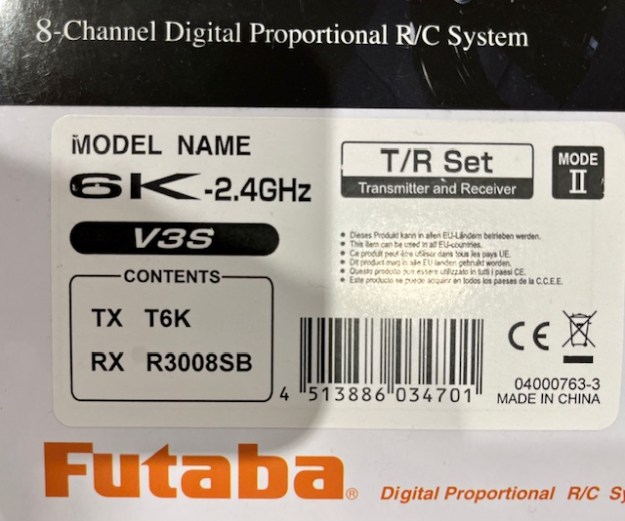
So you have selected which transmitter you want, then the online ordering page asks you which “Mode” you want! Drives you mad, doesn’t it!!?? Well, for radio sailing you want Mode 2.

On that photo of a box lid above, you will see it says Mode 2 in the top right hand corner.

So what is all this about??

It’s all about which way around the joysticks are arranged. For Mode 1, the throttle (‘mainsheet’ to you and me) is on the right, with Mode 2 the throttle/mainsheet os on the left. The convention for radio sailing is that we all use “Mode 2″…. mainsheet on the left, rudder on the right. So buy a Mode 2….

This seems true for both Flysky and Futaba transmitters. Why?? I had wondered if it was all about being left handed or right handed, but it doesn’t seem to be that reason. As you have probably twigged, radio sailors are in the minority for using these transmitters. The major applications will be drones, helicopters, planes, gliders, race cars. I think that some of those require the joysticks the other way around. Or as I just learned, combat robots use the sticks the other way around.

If any reader has re-written the manuals for Flysky and Futaba solely for radio sailing, would you donate them to this website? Else, I shall I have to re-write them someday. I was just reading a piece by somebody reading a Flysky manual and he said, “Half of it is in Chinese, and the other half may have well been…”

Anyway – purchase “Mode 2″…..

Futaba Controllers – Have You Seen a T6 10J ??

My recently arrived K2 came with a complete Futaba T6K transmitter setup. It’s the second one I’ve tried. The loan boat I borrowed had the same thing. I’m getting to love it.

At the weekend, we had some chatter at the lake-side with other owners saying they could usefully be more robust. There have been slider switches coming off, water getting in, and so on. Admittedly it does feel a tad ‘plastic’.

VS suggested we all take a look at the T6 model 10J. He says it’s a whole lot stronger, uses the same receivers, and is frankly roughly the same price…. well, there’s not much in it. It’s the difference between ‘quite a bit’ and ‘a lot’.

This is the first link I found when I googled it.

https://sloughrc.com/futaba-10j-10ch-combo-2-4ghz-ts-fhss-mode2-r3008sb.html

This is a pretty good description on the Ripmax website

http://www.ripmax.com/Item.aspx?ItemID=P-CB10J/L&Category=025-060

This is what they show on the Futaba USA website, and it does look a lot more metal over there

10J

If you have any experience of a 10J for radio sailing please leave us a comment on this post.

I’ll try and write something up, just as soon as I’ve seen one for real.