
At the weekend race session, two things came up which prompted this update to the Futaba Radio Sailing manual.

The first thing : Some time ago, Vernon suggested taking a look at the Futaba model 10J transmitter. For the cost of about 25 flat whites (£100 or 50% more than normal) you get a big upgrade to aesthetics, robustness (waterproofness maybe?)… and the way it physically handles – it’ll be a personal thing I realise. But I was smitten…. It felt great in my hands.
However, at the time of writing the 10J model is populated with mainly two position switches. It has one three position switch on the right hand side.
We have been trialling both rudder expo and “Pinch and Puff Mode” using three position switches. The models 6, 12, 16 and 18 have all had their switch inventory updated to three position switches. I don’t know if the same will happen for model 10J. You’d think it will follow the rest.
Since setting out to write a radio sailing user manual for each of the main transmitter brands – Spektrum, Futaba, Flysky and Radiomaster – I have become quite interested in the idea of how to use the transmitter to ease and maybe speed up the personal transition for a beginner to radio sailing,… from sailing to radio sailing.
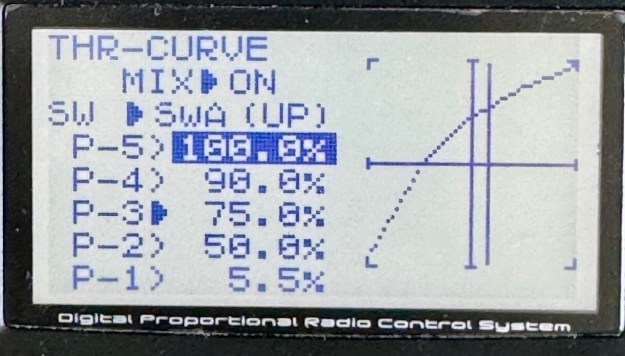
Some of the things that a beginner finds hard to do quickly enough in their hands and head at first, can be done by the transmitter instead – just while you learn. I am thinking of rudder expo, mainsheet curve (aka Throttle curve) and “Pinch and Puff” modes. Usually I tell people that the transmitters are pretty much the same, but in this regard they have varying capability.
My Spektrum will be back from the Doctor soon and I shall get on with producing the full radio sailor manual for that. At the present time, this website has a download pointer to the American MYA manual for the Spektrum DX6e.
The second thing : on Sunday, Nigel’s fabulous blog published an item on how to install “Pinch and Puff” mode using a Spektrum and implementing it not with 3-position switches… but with the left joystick. Clever. I’ve just set it up on the F6 Marblehead to test it.
The Beginner Guide for Radio Sailors on setting up the Futaba to do sailing P.MIX has been updated to include this great idea. Model 10J owners, take notes!!
Click here to see version 9 of the manual
 Datchet Radio Sailing - Making It All Much Easier !!