A very nice race report from last weekend’s Ten Rater Rankings. Hugh won day one and was second in day two!!
Hugh Wins at 10R Rankings…!!
Leave a reply

A very nice race report from last weekend’s Ten Rater Rankings. Hugh won day one and was second in day two!!
Like you, I know lots of radio sailors.
Around a year ago, when I was getting frustrated by Transmitter Manuals covering only airplanes, gliders, helicopters and drones… it was then that we decided that we would have to write our own user manuals for radio sailing transmitters (see Category on this website called “Transmitter Manuals”). The manufacturers are not going to lift a finger for us!! We are actually too small community for the moment. By the way, our radio sailing transmitter manuals are by far the most popular download on our website.

I was pretty encouraged to learn that MYA has 2,200+ members in UK. Good!! Did you know that around 1,500 people globally watched the IOM worlds on Youtube each day. Very good!!
Then I checked the number of licensed drone devices in the UK and found it was 500,000…. which puts us in proportion maybe. It’s therefore no surprise that we end up using RC flying radio gear adapted to sailing, buying transmitters with far more channels than we need and so on. I was beginning to realise that in radio sailing we are a tiny, tiny market. Then my Central Heating engineer came to do our annual boiler service and it turned out he is a radio control flyer.
The back of his van was half dedicated to plumbing kit and the other half given over to Radio Control flying. Fantastic in there – like the back of Phil H’s car! Our engineer’s big passion is for duration gliding competitions. In the back of the van he had a big glider plus a “flying wing”. I’d never heard of flying wings, have you?
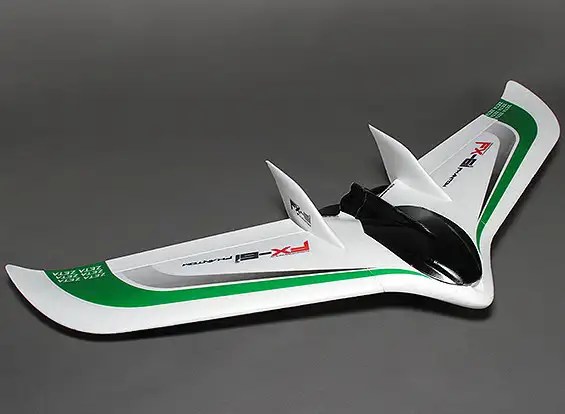
Basically, just two Wings bolted together with hardly any fuselage at all. It’s all the rage apparently.
Intrigued, I googled to find if radio flyers have an equivalent to MYA… and they do. In UK it has 750 Clubs affiliated. So what would you think? Perhaps 10 members per club average? So at 7500 members it would be three times the size of radio sailing? I then used their website to find my local RC Flying Club. It’s in Bromley, just over the hill from here. Number of members?? ….. not 10, but 200…… blimey.
So where do all the servos, receivers and antennae go in a flying wing? The amazing answer is that they want them inside the wing structures. They want FLAT devices… and FLAT might also mean LONG. Perhaps more importantly this means they want plugs into the receiver in-line (not at right angle), so that definitely means LONG.
Oddly enough, in radio sailing we do have confined spaces for Receivers in our boats, but the spaces are not generally all that large. We also want them away from damp and water. We often, but not always, use a pot of some kind to host the receiver and on-board battery. We’ll lay out a few implications in part 2 of this article.
To read Part 2, click here
Do you carry a copy of the Racing Rules with you when you go sailing? If you do, is it up to date for 2025-2028?? Is it inclusive of the Radio Sailing amendments?!!!
I know, I know …. it’s only March and there’s another thing you have to update 🙂
Nigel B has just sent me a link to John Ball’s super Radio Sailing Rules and Tactics website. Updated for 2025-2028 too!! It’s fantastic and all about US !! I’m so excited about it, I’ve included a link to it on the main menu bar of this website (above) …. you will see it just next to CALENDAR.
Now, if you are out sailing and you don’t have your Rules Book with you, you can see John’s website from your phone.
To give you a little flavour, try this section about giving room at the weather mark:-
https://drive.google.com/file/d/1CGVSz5ooL0VTtxqjDcDIdVyPMpQU6mnr/view
I used to have a paid-for app from the RYA on my phone containing the racing rules, but sadly they discontinued support for it, and anyway it was not inclusive of the radio sailing amendments. If yet another person saying “read the app on your phone” is making your eyes roll (I completely understand that!!) then consider getting Bryan Willis’ very slim compact rules companion (plastic pages, spiral bound etc) to pop in the glove compartment of your car…: It’s really small and takes up no room at all.

 Datchet Radio Sailing - Making It All Much Easier !!